

Passive Scan Rule
Create custom passive scan rules using YAML to detect security issues in your codebase.

A rule is one YAML file: an id, some info, and the patterns to match. Drop it in the rules directory and the next -P scan picks it up.
id: rule-id
info:
  name: "The name of the rule"
  author:
    - "List of authors"
    - "Another author"
  severity: "The severity level of the rule (one of: critical, high, medium, low)"
  description: "A brief description of the rule"
  reference:
    - "URLs or references related to the rule"

matchers-condition: "The condition to apply between matchers (and/or)"
matchers:
  - type: "The type of matcher (one of: word, regex)"
    patterns:
      - "Patterns to match"
    condition: "The condition to apply within the matcher (and/or)"

  - type: "The type of matcher (one of: word, regex)"
    patterns:
      - "Patterns to match"
      - "Another pattern"
    condition: "The condition to apply within the matcher (and/or)"

category: "The category of the rule (e.g., secret, vulnerability)"
techs:
  - "Technologies or frameworks the rule applies to"
  - "Another technology"
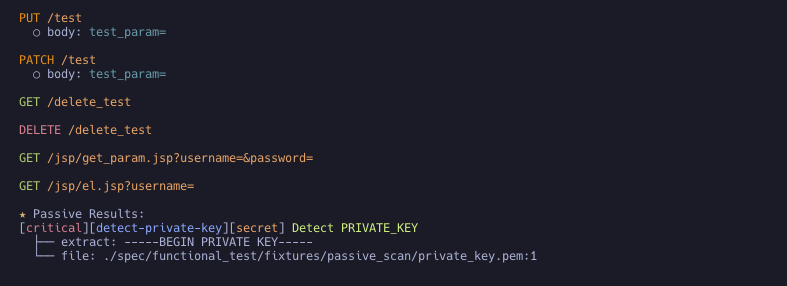
Example Rule: Detecting PRIVATE_KEY
id: detect-private-key
info:
  name: "Detect PRIVATE_KEY"
  author:
    - "security-team"
  severity: critical
  description: "Detects the presence of PRIVATE_KEY in the code"
  reference:
    - "https://example.com/security-guidelines"

matchers-condition: or
matchers:
  - type: word
    patterns:
      - "PRIVATE_KEY"
      - "-----BEGIN PRIVATE KEY-----"
    condition: or

  - type: regex
    patterns:
      - "PRIVATE_KEY\\s*=\\s*['\"]?[^'\"]+['\"]?"
      - "-----BEGIN PRIVATE KEY-----[\\s\\S]*?-----END PRIVATE KEY-----"
    condition: or

category: secret
techs:
  - '*'
Notes on rule fields
- Required:
id,info.name,info.severity, and at least one matcher with atypeandpatterns.matchers-conditionand each matcher'sconditiondefault toor.author,description,reference,categoryandtechsare optional. severityandmatchers[].typeare closed sets. A rule using any other value is invalid and is skipped with aSkipped invalid passive rulemessage, rather than partially applied.categoryis free-form.- Findings below the minimum severity are filtered out of the report, and the default minimum is
high. Aseverity: mediumorseverity: lowrule produces nothing until you lower the threshold with--passive-scan-severity. techsis result metadata copied onto each finding. It does not gate which files a rule runs against: every loaded rule is evaluated against every scanned file.- Matchers are evaluated line by line: a finding is a single line, and every matcher (and every pattern inside it) has to be satisfied by that one line. A
regexpattern written to span several lines (-----BEGIN PRIVATE KEY-----[\s\S]*?-----END PRIVATE KEY-----, for example) therefore never produces a finding on its own; pair it with awordmatcher on the opening marker. idmust be unique across the whole rule set. A second rule reusing an id is skipped with aSkipped duplicate passive rule idmessage, because the id is what the JSON output and the SARIFruleIdidentify a finding by.- A rule file may hold several
---separated YAML documents; every document is loaded as its own rule. - A rule that can never fire because a
regexpattern does not compile is rejected like any other invalid rule instead of being counted as loaded. That is the case when every matcher fails undermatchers-condition: or, or any matcher fails underand. If only some matchers fail underor, the rule still loads and Noir prints a warning naming the broken pattern. category: secretturns on a false-positive filter. Asecretfinding is dropped when the line only reads the value at runtime (process.env,os.getenv,ENV[...], a CI${{ secrets.X }}expression), holds a placeholder, or just names the variable without assigning it a literal. A line where aregexmatcher of the rule matches is always kept.- Every entry of
patternsmust be non-empty. An empty pattern (an explicit'', or a-list item with nothing after it, which YAML reads as null) matches every line of every scanned file. A rule carrying one is rejected so it can't flood the report.