

Using the Tagger for Contextual Analysis
Automatically tag endpoints and parameters to identify potential security risks.
Automatically add descriptive tags to endpoints and parameters to flag functionality and potential security risks (e.g., SQL injection, authentication endpoints).

Tags are my magnifying glass. A parameter named redirect_url gets flagged as ssrf before anyone reads the handler.
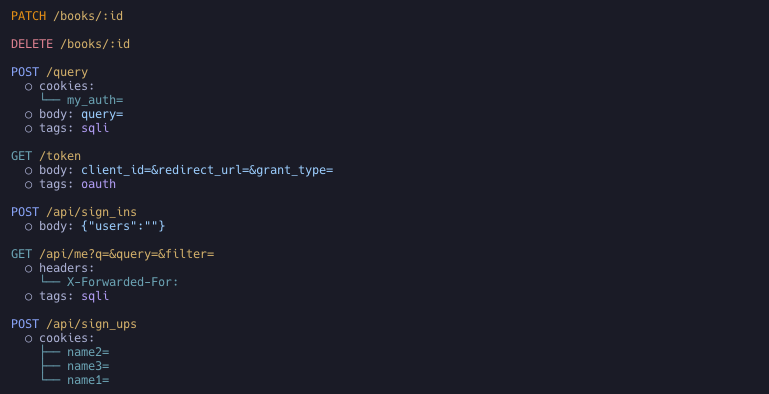
Usage
Tagger is disabled by default.
Enable all taggers (-T / --use-all-taggers)
noir scan <BASE_PATH> -T
# equivalent: noir scan <BASE_PATH> --use-all-taggers
Enable specific taggers (list available ones with noir list taggers)
noir scan <BASE_PATH> --use-taggers hunt,oauth
Output
Tags appear in the tags array at both the endpoint level and the parameter level. Each tag has a name (short identifier like sqli or oauth), a human-readable description, and the tagger that produced it (e.g., Hunt for vulnerability patterns, Oauth for authentication flows).
{
  "url": "/token",
  "method": "GET",
  "params": [
    {
      "name": "redirect_url",
      "value": "",
      "param_type": "form",
      "tags": [
        {
          "name": "ssrf",
          "description": "This parameter may be vulnerable to Server Side Request Forgery (SSRF) attacks.",
          "tagger": "Hunt"
        }
      ]
    }
  ],
  "protocol": "http",
  "tags": [
    {
      "name": "oauth",
      "description": "Suspected OAuth endpoint for granting 3rd party access.",
      "tagger": "Oauth"
    }
  ]
}
Tag categories
Taggers span several kinds of security-relevant signal. Run noir list taggers for the full, up-to-date list.
-
Parameter vulnerability classes:
huntflags individual parameters that match known-risky names (sqli,ssrf,idor,file-inclusion,command-injection, …). -
Protocol / interface:
graphql,soap,websocket,mcp,cors. -
Authentication & tokens:
oauth,jwt, plus the framework-aware auth taggers (Spring Security, Django, Express, …). -
Endpoint sensitivity & purpose: classify what an endpoint is for so reviewers can prioritize the highest-stakes surface:
pii: handles personally identifiable information (SSN, card data, contact details); review for data exposure and over-collection.admin: administrative or privileged routes (/admin, privilege-mutating parameters); prime targets for broken access control and privilege escalation.payment: payment / financial transaction endpoints; review for amount/price tampering, currency confusion, and IDOR on financial records.webhook: inbound webhook / callback endpoints; verify signature validation, replay protection, and SSRF on outbound calls.crypto: cryptographic operation endpoints (encryption/decryption, signing, hashing, key management); review for weak or obsolete algorithms, padding/signing oracles, static IV/salt reuse, and key exposure.debug: debug, diagnostic, and internal-only endpoints (debug consoles/toggles, profilers, actuator/management, pprof, heap/thread dumps,/internalAPIs); should not be publicly reachable; review for information exposure and unsafe diagnostic actions.api_docs: API documentation / schema endpoints (Swagger, OpenAPI, GraphiQL, ReDoc, WSDL); expose the full API surface and are frequently unauthenticated; review for unauthenticated exposure and information disclosure.account_recovery: credential-management and account-recovery endpoints (password reset/change, email change, MFA/OTP, verification); the classic account-takeover surface; review for reset-token leakage, host-header injection in reset links, account enumeration, and missing rate limiting.file_upload: file upload endpoints; review for unrestricted upload, path traversal, and malicious file handling.
-
Framework-specific protections & risks: framework-aware taggers that flag a framework's security controls and deviations from its secure defaults on the endpoints they affect. For Rails (
rails_security):csrf-protection: CSRF verification disabled (skip_before_action :verify_authenticity_token,skip_forgery_protection) or downgraded (protect_from_forgery with: :null_session); Rails protects state-changing requests by default, so an explicit opt-out is the case worth reviewing.mass-assignment: Strong Parameters bypassed (params.permit!,params.to_unsafe_h, or a rawparams[:x]hash passed to a model writer such asModel.new(params[:user])); review for attacker-controlled attribute writes (privilege flags, ownership columns).rate-limit: actions throttled by the Rails 8 nativerate_limitmacro; useful context when assessing brute-force / abuse exposure (and its absence on auth/recovery surface is itself a finding).
For Spring (
spring_security), complementing thespring_authauthentication tagger:csrf-protection: CSRF turned off in aSecurityFilterChain, either wholesale (csrf().disable(),csrf(AbstractHttpConfigurer::disable), Kotlincsrf { disable() }) or selectively for specific paths (csrf(c -> c.ignoringRequestMatchers("/api/**"))), reported on the state-changing endpoints (POST/PUT/PATCH/DELETE) affected; common for stateless/token APIs but always worth surfacing, and scoped to a chain'ssecurityMatcherwhen present.cors: a@CrossOriginannotation on the handler/controller, or a globalWebMvcConfigurermapping (addMapping(...).allowedOrigins("*")), opts the endpoint out of the browser same-origin default; wildcard origins (*), especially combined with credentials, are called out as permissive.security-headers: Spring's default response-header protections weakened: clickjacking off (frameOptions().disable()) or the whole header writer disabled (headers().disable()/headers(HeadersConfigurer::disable)).input-validation:@Valid/@Validatedapplies Bean Validation to the request payload; surfacing where it is applied also makes the gaps (handlers taking a@RequestBodywithout it) visible by their absence.
For Rust web frameworks (
rust_security, covering Actix-Web, Axum/tower-http, Rocket, Loco, Warp, …): Rust has no implicit secure defaults, so the tagger records the protections actually wired up (via.wrap(..)/.layer(..)middleware, or Loco'sconfig/*.yaml) and flags the dangerous configurations:cors: CORS middleware. Permissive configs (Cors::permissive(),CorsLayer::very_permissive(),allow_any_origin,allow_origins: ["*"]) are flagged as a risk; restricted allow-lists are recorded as informational.rate-limit: request throttling (actix-governor,tower_governor,actix-limitation, tower's limit layers); maps onto the scope it wraps, so you can see which routes are not protected.security-headers: hardening response headers set on the route (HSTS, CSP,X-Frame-Options,X-Content-Type-Options, …).body-limit: request body size cap (DoS mitigation); a disabled limit (DefaultBodyLimit::disable()) is flagged as a risk.
For Go web frameworks (
go_security) the protective middleware is what gets mapped onto each endpoint: unlike Rails, Go ships none of it on by default, so its presence (and absence on a state-changing route) is the signal. Detected from group-level.Use(...), global wrappers, and inline route middleware across Echo, Gin, Fiber, Chi, and friends:csrf-protection: CSRF middleware on the route (middleware.CSRFfor Echo,csrf.Newfor Fiber,csrf.Protectfor gorilla/csrf, gin-csrf,nosurf); its absence on cookie-authenticated state-changing routes is the case worth reviewing.security-headers: response-hardening middleware (Echomiddleware.Secure, Fiberhelmet, unrolled/gin-contribsecure) setting HSTS /X-Frame-Options/ nosniff / XSS protections.rate-limit: throttling middleware (EchoRateLimiter, chiThrottle, Fiber/ululelimiter, go-chi/httprate, tollbooth); maps brute-force / abuse exposure.body-limit: request-body size cap (EchoBodyLimit, gin-contrib/size); a DoS / resource-exhaustion guard.timeout: request-timeout middleware (Echo/chimiddleware.Timeout, Fibertimeout); a slow-request / resource-exhaustion guard.cors: CORS middleware (Echomiddleware.CORS, Fiber/gin-contrib/go-chi/rscors, gorillahandlers.CORS); known-permissive constructors (cors.Default(),cors.AllowAll()) are flagged as allowing all origins. Complements the header-param-basedcorstagger.secure-cookies: cookie confidentiality/integrity middleware (Fiberencryptcookie).
Endpoint-level tags also feed the AI context as signals, so they appear in the per-endpoint summary an AI reviewer reads.