

Delivering Results to Other Tools
Probe endpoints through Burp/ZAP, or export them to Elasticsearch or a webhook.
Noir can deliver results in two ways:
- Probe: fire HTTP requests at the endpoints Noir just discovered (active replay, optionally through a proxy like Burp Suite or ZAP).
- Export: send the endpoint catalog as data to Elasticsearch, OpenSearch, or any webhook receiver. No traffic goes to the endpoints themselves.

Probe replays, export ships. Pick the one that matches where the results should end up.
Probe
Relevant flags:
| Flag | Purpose |
|---|---|
--probe |
Fire HTTP requests at each discovered endpoint (needs -u) |
--probe-via URL |
Route probes through this proxy URL |
--probe-header VAL |
Add a header to every probe (repeatable) |
--probe-match VAL |
Only probe endpoints matching the pattern (URL, method, or method:URL) |
--probe-skip VAL |
Skip endpoints matching the pattern |
--probe and --probe-via are independent. Passing both sends every endpoint twice, once through the proxy and once directly, which doubles the load on the target. Pass only --probe-via if you just want the traffic in your proxy.
Path templates
A discovered route like /users/{id} cannot be requested literally, so Noir fills the placeholder before probing read-only verbs only (GET, HEAD, OPTIONS, QUERY). Numeric-looking names (id, page, *_id, …) get 1; everything else gets noir.
POST, PUT, PATCH and DELETE keep the literal template. Filling them would turn a harmless 404 into a real write (DELETE /users/1 against a live record), so Noir does not do it for you. Through a proxy the template still arrives, and you can edit and replay it deliberately.
Override the value with --pvalue path=..., which applies to every verb:
noir scan ./source -u http://localhost:3000 --probe --pvalue path=id=42
The automatic fill only touches the outbound request; the report keeps the original template. A --pvalue path=... value is different: it is written into the reported URL too (/users/:id is reported as /users/42).
Replay through a proxy
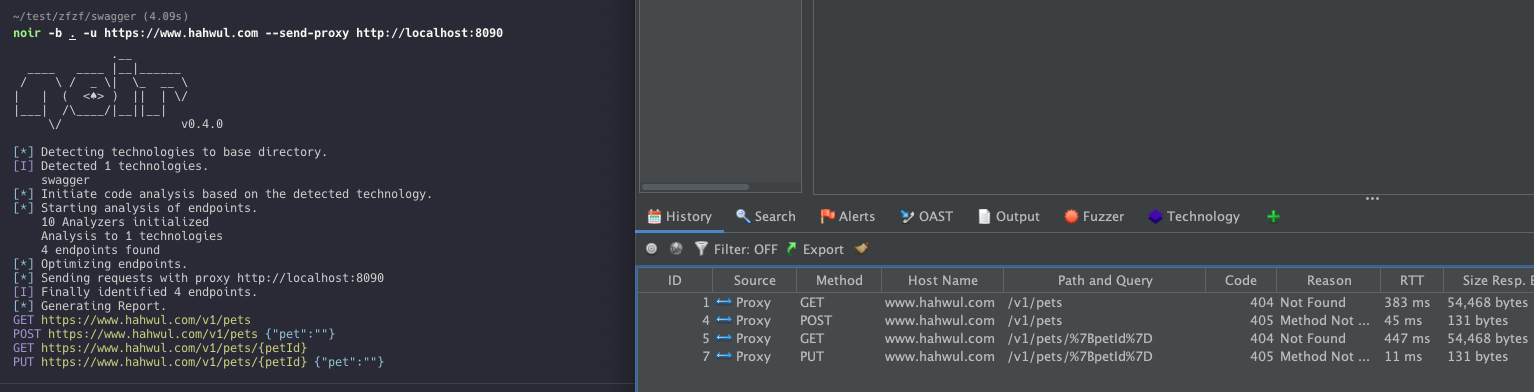
Send every endpoint through a local Burp/ZAP proxy so its scanner picks them up.
noir scan ./source -u http://localhost:3000 --probe-via http://localhost:8080
The proxy port is required. --probe-via http://localhost is rejected rather than guessed, because a proxy URL without a port cannot be routed and probes would otherwise go straight to the target instead. A bare host:port (the form curl -x takes) is accepted and read as http://host:port.
Custom headers
Attach an auth token or any other header to every probe.
noir scan ./source -u http://localhost:3000 \
  --probe-via http://localhost:8080 \
  --probe-header "Authorization: Bearer your-token"
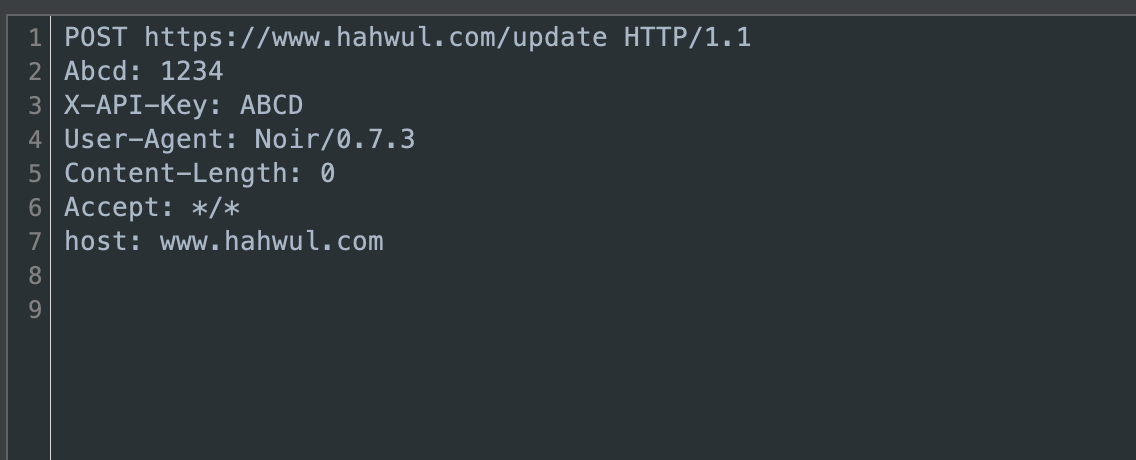
These headers go to the -u target and nowhere else. Most endpoints are paths that Noir joined onto -u. An endpoint that already carried its own scheme and host in the source (an OAS servers: entry, a HAR capture, a hosted-backend URL) keeps that host. That host came from the code you are scanning, so Noir probes the endpoint without your headers and names the host once so you can see what was withheld:
▲ Probe: --probe-header values withheld from https://collector.example.com — it is not the --url target. Endpoints on that host are still probed, without your headers.
Export destinations (--export-es, --export-webhook) are unaffected: you named those hosts yourself, so --probe-header still authenticates them.
Match / skip
Narrow the set of endpoints sent through the proxy. Patterns accept a URL substring, an HTTP method (case-insensitive), or method:URL combined.
# Only API endpoints
noir scan ./source -u http://localhost:3000 --probe-via http://localhost:8080 --probe-match "api"

# Only GET requests
noir scan ./source -u http://localhost:3000 --probe-via http://localhost:8080 --probe-match "GET"

# Skip POST requests
noir scan ./source -u http://localhost:3000 --probe-via http://localhost:8080 --probe-skip "POST"

# POST requests to /api only
noir scan ./source -u http://localhost:3000 --probe-via http://localhost:8080 --probe-match "POST:/api"

# Skip GET requests to /admin
noir scan ./source -u http://localhost:3000 --probe-via http://localhost:8080 --probe-skip "GET:/admin"
Supported HTTP methods: GET, POST, PUT, DELETE, PATCH, HEAD, OPTIONS, TRACE, CONNECT, QUERY.
Multiple --probe-match / --probe-skip flags compose:
noir scan ./source -u http://localhost:3000 \
  --probe-via http://localhost:8080 \
  --probe-match "GET" --probe-match "POST:/api"
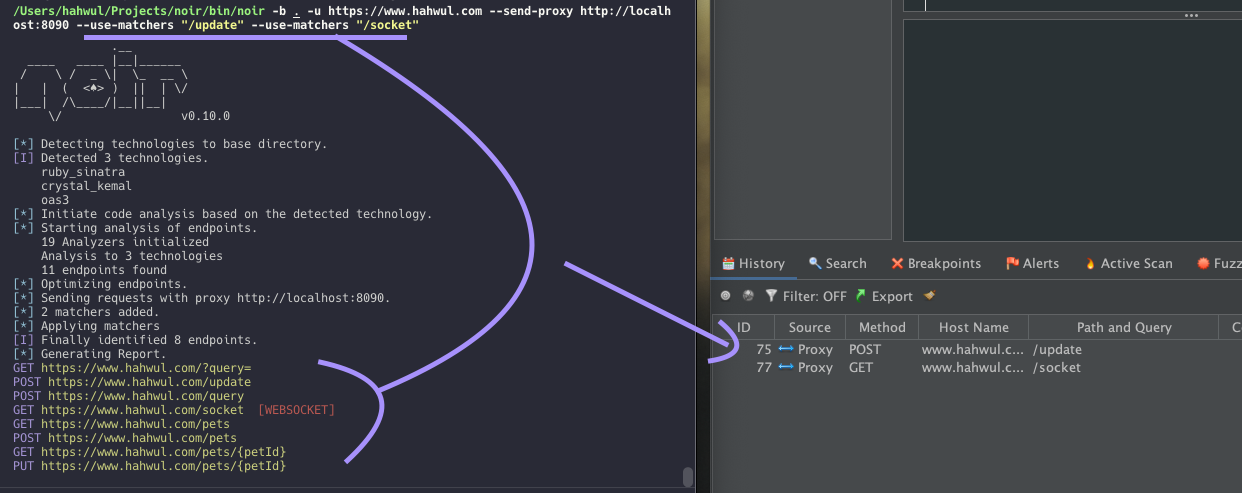
The screenshot below comes from an older release and uses two URL patterns instead, /update and /socket (through the v0 alias --use-matchers), so only those two endpoints reach the proxy.
Export
Send the endpoint catalog to an external data store. Unlike probing, no traffic goes to the endpoints.
| Flag | Purpose |
|---|---|
--export-es URL |
Index the catalog in Elasticsearch |
--export-opensearch URL |
Same, for OpenSearch (identical wire protocol for this shape) |
--export-webhook URL |
POST the catalog as one JSON document to any HTTP receiver |
Elasticsearch / OpenSearch
Pass the full document endpoint. Noir POSTs to exactly the URL you give it and does not append an index or _doc path of its own:
noir scan ./source --export-es http://localhost:9200/noir/_doc
A portless http:// URL defaults to port 9200. A portless https:// URL keeps the scheme default instead, because managed clusters (AWS OpenSearch Service, Elastic Cloud) and TLS reverse proxies listen on 443.
Authentication reuses --probe-header. Despite the name, those headers are attached to export requests too:
noir scan ./source --export-es https://my.cloud.es.io/noir/_doc \
  --probe-header "Authorization: ApiKey <base64-key>"
Webhook
POSTs the whole catalog as a single JSON document:
noir scan ./source --export-webhook https://hooks.example.com/noir
The body carries three fields:
| Field | Contents |
|---|---|
endpoints |
the same array -f json would have written |
endpoint_count |
number of entries in endpoints |
noir_version |
the Noir version that produced the document |
Slack incoming webhooks, Discord webhook endpoints, Zapier/n8n triggers and custom internal receivers all accept any JSON body, so this one shape covers the common destinations. If a receiver needs its own shape (Slack's {"text": ...} blocks, say), put a transformer in between. Noir has no per-platform formatters.
TLS
Probe and export both verify TLS certificates. --tls-skip-verify switches to an insecure context for self-signed internal hosts.
Proxy delivery is the exception: --probe-via always skips verification, because an intercepting proxy presents its own certificate and every replayed request would otherwise fail the handshake.
v0 aliases
The v0.x flag names still work. Noir maps them to the v1 names without a warning:
| v0 flag | v1 equivalent |
|---|---|
--send-req |
--probe |
--send-proxy URL |
--probe-via URL |
--send-es URL |
--export-es URL |
--with-headers VAL |
--probe-header VAL |
--use-matchers VAL |
--probe-match VAL |
--use-filters VAL |
--probe-skip VAL |
CI scripts and Dockerfiles that use the v0 names keep working. Help output, docs and shell completion show only the v1 names.